Apr 24, 2017
Posted in blog, Featured, Information Security, Tools, Tutorial
BurpSuite & ZAP Bypass Proxy
I wanted to make this tutorial for users that might get stuck in a similar situation.
I was security testing a website using Burpsuite and would end up with SSL Handshake failures. And, it really made no sense at first since Burpsuite uses Java. And, I had the latest version of Java installed on my machine. Burpsuite was giving me SSL Handshake failure alerts and was asking me to install JCE Strong Cipher policies. Turns out the website was using VERY strong ciphers (which is a very good thing). And, they were using no medium or outdated ciphers.
Now, these ciphers are so strong that even the latest Java package does not contain them….yet.
So that meant I had to find another way to use Burpsuite, but still have the ability to make a proper SSL handshake using the strong ciphers. I then turned to another similar product called OWASP ZAP. This is a great product and I have used it back when I didn’t quite have the funds to purchase Burpsuite. What I realized was that I could use Burpsuite and have ZAP filter my traffic for me. For some reason ZAP has all of the strong ciphers and did not fail the SSL handshake, which meant I could transfer traffic as:
Browser -> Burpsuite -> ZAP -> Webserver
(more…)
Apr 5, 2017
Posted in Featured, Information Security, portfolio, Reviews
Passing the CISA exam – Certified Information Systems Auditor
So I though it would be interesting to post up a blog post about my experience challenging the the CISA exam last year in 2016.
I had started this blog a bit afterwards, and never really thought about posting my experience. But, many others have always asked about my experience taking the CISA exam ,and if there were any tips I could give them to better their chances of passing the exam. My hope is this post helps those that end up reading this and gives them a better insight on the adventure of obtaining the ISACA CISA certificate.
Preparing for the CISA exam
(more…)
Jan 23, 2017
Posted in Encryption, Information Security
Public Wi-Fi Security
Today in our current world we have access to free public wifi practically around ever corner street. Most cafes and restaurants offer free public WiFi to just about anyone. What people fail to realize is that technology is no different in the public compared to people being in public.
Let’s create a real life use case. You could be taking a nice stroll down at your local park. When someone comes by and starts taking photo’s of you and others at the park. They know have “access” to an image of you without your knowledge. But, (more…)
Dec 19, 2016
Posted in Featured, Information Security, mobile, portfolio, Tutorial
Mobile Hardening
A question I often get asked by a lot of mobile users is regarding how they can secure “harden” their mobile devices. What can they do to add some layers of protection to secure their mobile devices?
There aren’t a whole lot of software tools that are out there which actually harden mobile devices. And, it’s a bit unfortunate that mobile security has a lower priority these days.

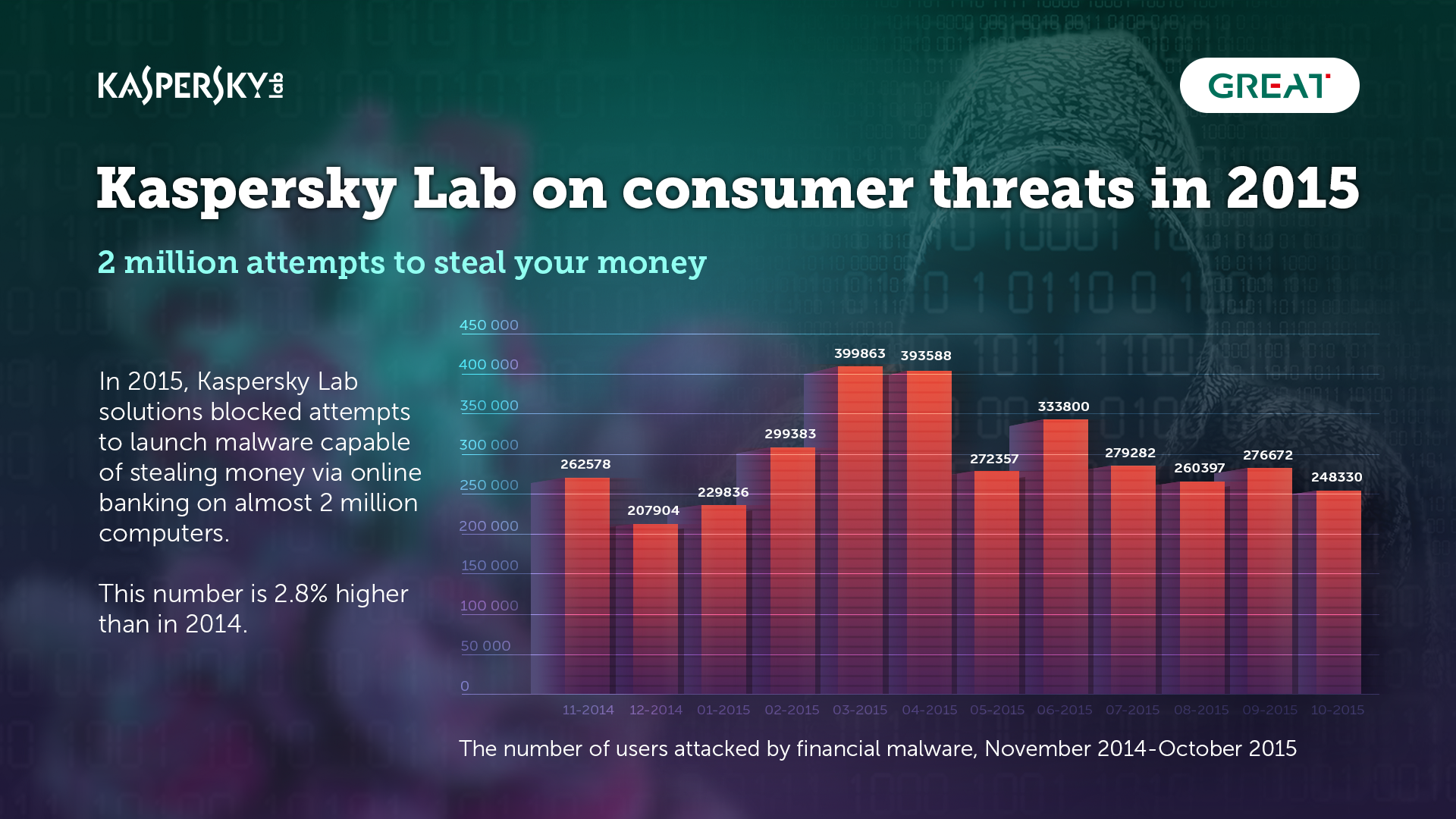
Kaspersky Threats 2015
Courtesy of (https://www.kaspersky.com)
For most Android and iOS devices there are a few steps and actions that you can take in order to harden your mobile device.
The following steps should give you some basic hardening techniques for personal use.
(more…)
Dec 12, 2016
Posted in Encryption, Information Security, Quick Tips, Tutorial
HTTPS Site Wide
So, I wanted to write up a quick tutorial on using HTTPS globally or on certain directories of a website.
I had a friend asking me about how they could force HTTPS throughout their whole website. So, I listed a tutorial below to do so and he was able to accomplish HTTPS site wide.
Now, there are multiple ways this can be achieved. In the case of my friend he was on a shared hosting web server. Therefore, shared webhosting users normally will not have access to modify the apache config files.
So that leaves us with a simple solution (htaccess) that all users can make use of fairly easily. All it required is a file edit or creation of a file and the ability to FTP or upload it to your web root directory.
What is an htaccess file?
(more…)

















 My name is Harry Taheem
I am a Cyber Security Engineer.
My aim is to post things I learn or find interesting and allow others to hopefully gain some more insight. I also plan on posting general IT related issues, as I’d like
My name is Harry Taheem
I am a Cyber Security Engineer.
My aim is to post things I learn or find interesting and allow others to hopefully gain some more insight. I also plan on posting general IT related issues, as I’d like 

